
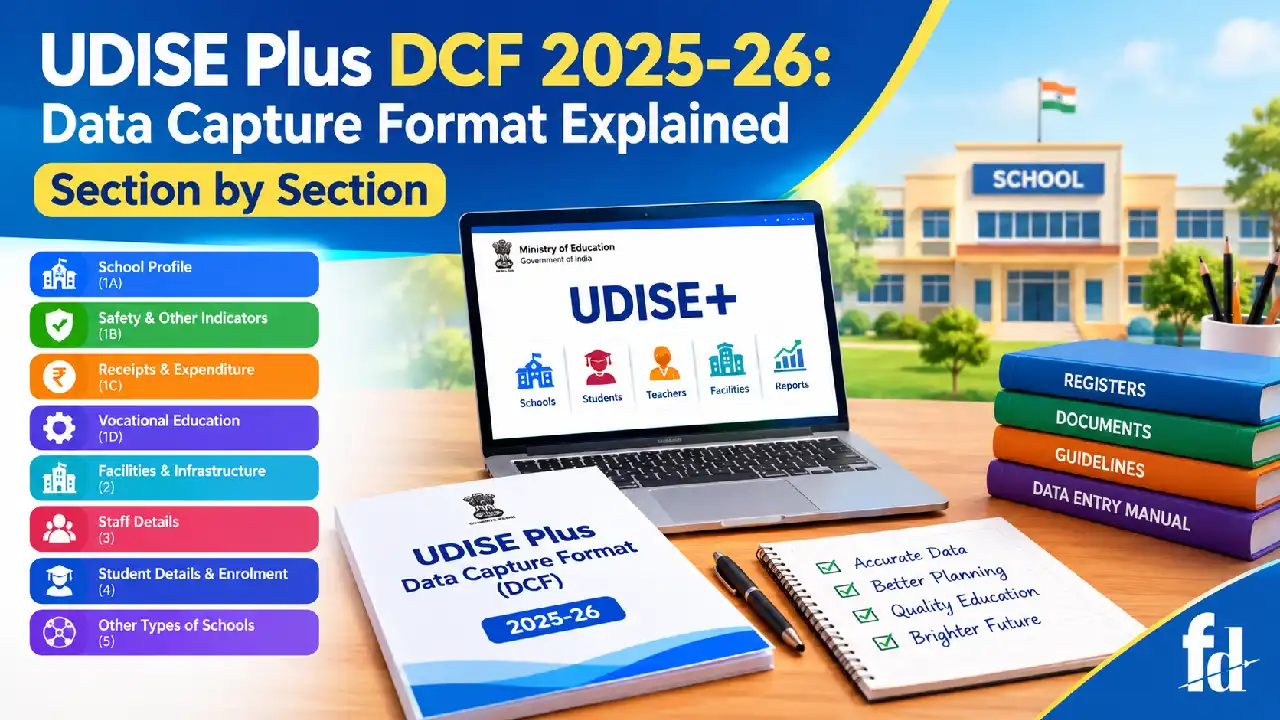
Understanding the UDISE plus dcf format 2025-26 is important for school heads, principals, teachers, and administrators who need to submit correct school information through India’s Unified District Information System for Education Plus (UDISE+).
The Data Capture Format (DCF) provides a structured way to record details about a school’s identity, facilities, teachers, students, safety measures, and other important areas. Completing it correctly helps education authorities understand the actual condition of schools and plan suitable improvements.
Many school staff members find the format difficult because it contains several sections, different types of information, and fields that must match official school records. A small mistake in student enrolment, teacher details, school management, or infrastructure reporting can create inconsistencies during verification.
This guide explains the format section by section, identifies the records schools should prepare, and provides practical examples to make the process easier. It also explains how to find the official document, prepare information before data entry, and avoid common reporting mistakes.
What Is the UDISE+ Data Capture Format?
The UDISE+ Data Capture Format is a structured questionnaire used to collect school-level information for the Ministry of Education, Government of India. It covers schools offering education from pre-primary to Class 12 and collects information that supports education planning, monitoring, and the preparation of official statistics.
The UDISE plus data capture format is not simply a form for recording student numbers. It covers a wider range of information, including school management, physical infrastructure, teaching and non-teaching staff, student profiles, enrolment, expenditure, safety, and vocational education where applicable.
According to the official UDISE+ portal, the system’s 2025–26 statistics list approximately 14.67 lakh schools, 24.72 crore students, and 1.02 crore teachers. These figures illustrate the scale of the information system and the importance of collecting consistent school-level data.
Official resources:
- UDISE+ official portal
- Official 2025–26 Data Capture Format PDF
- Ministry of Education: UDISE+ DCF Proforma
Schools should use the document and instructions applicable to their reporting year. An older form may contain different fields or instructions, so it should not automatically be treated as the correct version for the current session.
Why Is the DCF Important for Schools?
The information submitted through UDISE+ helps education departments understand school conditions across states, districts, and different management categories. Authorities can use the information for planning, monitoring, and reviewing educational services.
Accurate reporting matters for several reasons:
- Education planning: Enrolment and school-category data help authorities understand where educational services are needed.
- Infrastructure assessment: Information about classrooms, toilets, drinking water, electricity, and digital facilities helps identify gaps.
- Teacher planning: Staff information supports the assessment of teacher availability and workforce distribution.
- Student monitoring: Student-level information supports enrolment records and progression-related activities.
- Official statistics: Aggregated information contributes to reports about the country’s school education system.
For example, imagine a government school has 420 students but accidentally reports 402. That difference may seem small, but incorrect figures can affect district-level totals and make comparisons less reliable. Similarly, reporting a functional computer laboratory when the equipment is no longer usable can create an inaccurate picture of the school’s facilities.
The goal is not merely to complete every field. It is to submit accurate, verifiable, and internally consistent information.
UDISE Plus Academic Year 2025–26: What Schools Should Know
The reporting year matters because student enrolment, teacher strength, school facilities, and other details may change between academic sessions.
The udise plus academic year 2025–26 identifies the reporting cycle covered by the official DCF. Schools should follow the reference dates and instructions given for that cycle rather than mixing information from 2024–25 or a later year.
Before completing the form, the school should establish which records and dates apply to each field. Some information describes the school’s current profile, while other information relates to student progression or a specified reporting period.
For example, a school might have 390 students at the end of one session and 415 after new admissions in the next session. Staff should not copy the earlier total into a field asking for the later session’s enrolment.
Use these basic rules:
- Confirm the academic year shown in the official DCF.
- Check the instructions attached to each section.
- Identify the relevant reporting date or period.
- Use the appropriate admission, attendance, staff, and financial records.
- Ask the Block or District MIS coordinator when a field is unclear.
Do not assume that every field refers to the same date. Follow the specific instruction provided for that item.
How to Download the Official DCF PDF
Schools often prefer to review the form before entering information online. A PDF copy makes it easier to identify required records, divide responsibilities among staff members, and prepare answers in advance.
To locate the official form, follow these steps.
- Visit the UDISE+ official portal.
- Look for the relevant reporting-year resources, notices, or documentation.
- Open the Ministry of Education’s DCF Proforma page if you need the official document listing.
- Check that the document specifically identifies Academic Year 2025–26.
- Download the PDF and retain a copy for reference.
You can also open the 2025–26 DCF document hosted by the Delhi Directorate of Education.
This is the document commonly sought when searching for a udise dcf pdf download. Check the title, academic year, and applicable instructions before using it.
Important: A downloadable DCF is useful for preparation, but it should not be mistaken for proof that a school’s information has been submitted successfully. Follow the official portal and instructions issued by the relevant education authorities for the actual reporting process.
Documents and Records to Prepare Before Filling the DCF
Preparing information in advance reduces errors and avoids repeated interruptions during data entry. Each school should use its own verified records rather than estimates or information copied from unrelated schools.
The following table provides a practical preparation checklist.
Information required | Records to check |
School identity and location | Official school records, address, UDISE+ code |
Management and school category | Recognition records and applicable department documents |
Student enrolment | Admission register and class-wise enrolment records |
Student profiles | Student records maintained under applicable instructions |
Teacher information | Staff register, appointment records, qualifications and service details |
Non-teaching staff | Establishment and staff records |
Infrastructure | Physical inspection, facility registers and maintenance records |
Computers and digital resources | Equipment inventory and actual availability |
Receipts and expenditure | Relevant financial statements and accounts |
Safety information | Available safety records and verified school arrangements |
Vocational education | Programme records, subjects and participation information, where applicable |
For instance, if the admission register lists 38 students in Class 6 but the class teacher’s working sheet lists 36, the school should resolve the discrepancy before entering the final figure.
The head of the school should also assign responsibility for reviewing each group of records. One person may verify student enrollment, another may check staff details, and an authorized administrator may review the final submission.
Understanding the Main Sections of the 2025–26 DCF
The official document groups school information into several main sections. These cover school profile and other details, facilities, staff, students, and additional school categories reported at the appropriate administrative level.
Section | Main subject | What it covers |
Section 1A | School profile | School identity and basic profile information |
Section 1B | Safety and other indicators | School safety and related reporting fields |
Section 1C | Receipts and expenditure | Financial information |
Section 1D | Vocational education | Relevant vocational education details |
Section 2 | School facilities | Physical facilities, equipment, computers and digital initiatives |
Section 3 | Teaching and non-teaching staff | Staff details |
Section 4 | Student details | Student-level information |
Section 5 | Other types of schools | Information about specified schools or centres collected at block level |
The precise questions and applicable requirements should always be checked against the official 2025–26 PDF. The following explanations describe the purpose of the sections and the records schools should prepare.
Section 1A: School Profile Details
The UDISE plus profile section establishes the school’s basic identity. It helps ensure that the information entered in the remaining sections belongs to the correct institution.
This section is particularly important because errors in the school’s name, address, management category, or other identifying information may affect the consistency of its record.
School name, code, and location
Schools should check their official name and existing UDISE+ code before proceeding. The code identifies the school within the system and should not be casually changed or substituted.
Verify the following details where requested:
- School name as recorded officially
- UDISE+ code
- State, district, and other administrative location fields
- Rural or urban location, as applicable
- School address and relevant identification details
- School category and management information
- Medium of instruction and other profile fields
For example, if a school is officially recorded as “Government Higher Primary School,” staff should not enter a different name simply because the local community uses a shorter version.
Likewise, a school should not select a private management category merely because it receives a particular grant. Management must be recorded according to the applicable official classification.
Classes and school category
The school must report its applicable classes and category accurately. A school that offers education only through Class 8 should not report Class 10 merely because it shares a campus with a separate secondary school.
Staff should verify the school’s recognized structure and the instructions provided for the relevant profile fields.
Practical verification checklist
Before moving to the next section, confirm that:
- The correct school record is open.
- The UDISE+ code matches the school’s existing record.
- The name and location are correct.
- The management category is supported by official records.
- The classes offered match the school’s actual approved structure.
- No field has been filled using an unsupported assumption.
The completed school profile UDISE information provides the foundation for the rest of the submission.
Section 1B: School Safety and Other Indicators
Section 1B covers school safety and other indicators specified in the official form. These questions help build a broader picture of the conditions in which students learn.
The school should consult the exact questions in the PDF because requirements may differ according to the field and its instructions.
What records should be reviewed?
Depending on the applicable questions, staff may need to review available records relating to:
- Safety arrangements and school procedures
- Relevant inspections or maintenance records
- Emergency preparedness measures
- Other indicators specifically requested in the form
A school should report what is actually in place, not what it plans to introduce later.
For example, if the school has identified an emergency exit but the exit is blocked, staff should not automatically treat the arrangement as fully functional. The appropriate response must follow the field’s wording and reporting instructions.
How to avoid mistakes
The person completing this section should confirm the information with the staff member responsible for the relevant arrangements. If a field uses a term that has a specific administrative meaning, the school should check the official instructions rather than guessing.
Accurate safety reporting helps maintain reliable records and can draw attention to areas that need improvement.
Section 1C: Receipts and Expenditure
Section 1C deals with receipts and expenditure. It is intended to capture financial information requested by the official DCF.
Schools should not rely on rough estimates when verified financial records are available.
Records to keep ready
Depending on the fields applicable to the school, prepare:
- Relevant financial statements
- Receipts and expenditure records
- Grant-related records
- Supporting accounts and statements
- Information for the period specified in the form
The reporting period is especially important. A financial amount covering one financial year should not be entered into a field asking for a different period.
For example, if the school received ₹2,00,000 in grants during the period requested but spent ₹1,55,000, staff should report the applicable receipt and expenditure figures separately wherever the form requires them. They should not enter the balance as the total expenditure.
Before submission, compare the figures with the school’s accounts and resolve any differences.
Section 1D: Vocational Education Details
Section 1D covers vocational education details. It is relevant to the information requested for schools offering applicable vocational programmes.
Schools should review the official form to determine which questions apply to their circumstances. They should not assume that every school must report the same programmes or activities.
Information to verify
Depending on the applicable fields, schools may need to review:
- Vocational subjects or programmes offered
- Relevant classes or grades
- Student participation
- Programme-related staff or other details requested by the form
For example, if a school offers a vocational subject to students in a particular grade, the school should check the official programme records before reporting the relevant information.
If a school does not offer a programme, staff should follow the form’s instructions for the applicable response. They should not invent programme details to avoid leaving a field incomplete.
The central principle across Sections 1A to 1D is simple: use verified records, read each field carefully, and follow the instructions for the reporting year.
Section 2: School Facilities and Infrastructure
The UDISE plus facilities section records information about the physical facilities and resources available at a school. This section helps education authorities understand whether students have access to suitable classrooms, sanitation, drinking water, electricity, learning equipment, and other facilities covered by the official form.
Infrastructure reporting should reflect the school’s actual condition. A facility that exists but cannot be used should not automatically be reported as functional. School staff should inspect the premises and compare their findings with the relevant records before completing the form.
Classrooms and school buildings
Start by checking the classrooms and buildings used for teaching. The school should distinguish between the number of rooms available and the number used for particular purposes, according to the definitions in the official DCF.
Check the applicable fields for:
- School building and classroom details
- Rooms used for teaching
- Rooms used for other purposes
- Library and laboratory facilities, where applicable
- Building condition and related infrastructure information
For example, a school may have 12 rooms, but two are used for administration and one is being repaired. The school should not automatically report all 12 as classrooms available for teaching. The correct entry depends on the precise wording of each field.
Drinking water and sanitation
Drinking water and sanitation are important parts of a school’s learning environment. When reviewing these facilities, staff should check both their availability and the conditions specified in the form.
The inspection may include:
- Drinking water sources and availability
- Toilets and urinals, where applicable
- Separate facilities for boys and girls
- Facilities for children with disabilities, where requested
- Handwashing arrangements
- The condition and usability of the facilities
Suppose a school has separate toilets for boys and girls, but one toilet block has been closed because of a damaged water line. The school should check the applicable definitions before recording the facility as functional.
It is also important to distinguish between the existence of a facility and its usability. Accurate information can help authorities identify areas where maintenance or improvement is required.
Electricity and digital facilities
Electricity, computers, internet access, and other digital resources can support teaching and learning. However, reporting should reflect actual availability rather than plans or equipment that is no longer usable.
Check the applicable questions about:
- Electricity connections
- Computers and other equipment
- Internet connectivity
- Digital learning resources
- Smart classrooms or related facilities, where requested
For example, a school may own 15 computers, but only 10 may be working. If the form asks for functional computers, the school should report the number that meets the official definition of functional rather than the total number purchased.
Similarly, having a router does not necessarily mean that the school has a working internet connection. The entry should reflect the specific information requested by the DCF.
Playground, library, and learning resources
Where the official form requests information about playgrounds, libraries, laboratories, or other learning resources, the school should verify each facility separately.
A library may have books but no separate library room. A playground may be available outside the school campus under an approved arrangement. These situations should be reported according to the form’s definitions rather than being forced into an assumed category.
The person completing the form should ask:
- Does the facility exist?
- Is it available to the school?
- Is it functional, if functionality is requested?
- Does the official definition include this type of facility?
- Is supporting information available if verification is needed?
A short physical inspection can prevent many reporting errors.
Accessibility and facilities for children with disabilities
Where the DCF requests accessibility information, schools should report the arrangements that actually exist. These may include ramps, accessible toilets, handrails, or other features identified by the official form.
For example, a ramp at the entrance does not necessarily establish that every classroom and toilet is accessible. Staff should report each requested item independently.
The purpose is to provide an honest picture of the school’s facilities so that gaps can be identified and addressed.
Section 3: Teaching and Non-Teaching Staff
Section 3 covers teaching and non-teaching staff information. Teacher data is important for understanding the school’s workforce, qualifications, subject coverage, and staffing patterns.
The UDISE plus teacher profile should be completed using verified service records and the instructions for the applicable reporting year. Staff information should not be copied blindly from an earlier year’s submission because appointments, transfers, retirements, and other changes may have occurred.
Teacher identity and employment details
Depending on the fields in the official DCF, staff records may include:
- Teacher identification details
- Gender and other requested demographic information
- Professional and academic qualifications
- Appointment or employment category
- Relevant teaching assignment
- Other service details requested in the form
The exact fields and definitions must be confirmed in the official document. Schools should not collect or enter additional personal information simply because it appears in an older form.
For example, a school may have 18 teachers in its staff register, but one teacher may have transferred before the applicable reporting date. The school should verify whether that teacher belongs in the reporting population for the field concerned.
Qualifications and professional training
Teacher qualifications must be recorded carefully. A qualification should not be assumed from a teacher’s job title or years of experience.
The school should check the appropriate certificates, service records, and other documents required by the reporting instructions. If a qualification is still being completed, staff should not record it as completed unless the official rules specifically permit that classification.
Where professional training information is requested, the school should use verified training records.
Teacher deployment and subject allocation
Schools may need to review teacher assignments and the classes or subjects they teach, depending on the form’s questions.
Consider a school with 10 teachers, including two science teachers. If one science teacher has been assigned administrative duties and no longer teaches the relevant classes, the school should follow the exact field definitions when reporting teacher deployment.
The aim is to represent the school’s staffing situation accurately, not simply to reproduce the sanctioned strength or the total number of names in the establishment register.
Non-teaching staff
Administrative staff, support staff, and other non-teaching employees should be reported according to the categories defined in the official DCF.
For example, a school may employ a clerk, a laboratory assistant, and a support worker. Each person should be classified according to the applicable instructions rather than being placed under a teaching category.
Common staff-data mistakes
Avoid these errors:
- Counting a transferred employee without checking the reporting rules
- Recording a qualification that has not been completed
- Entering a teacher under the wrong employment category
- Confusing sanctioned posts with staff actually in position
- Duplicating a staff record
- Using outdated staff information from a previous session
Before finalizing this section, compare the entered information with the current staff register and relevant service records. Any mismatch should be resolved by the authorized school official.
Section 4: Student Details and Enrolment
Student information is a central part of school reporting. Section 4 covers student details, while the applicable enrolment information helps describe how students are distributed across classes and categories.
The UDISE plus enrollment section should be completed using the official student records and the reporting rules for the academic year. Schools should take particular care when dealing with transfers, new admissions, repeated entries, and students who have moved between classes.
Class-wise enrolment
Class-wise enrollment information helps authorities understand how many students are enrolled in different grades.
The school should check the applicable fields for class, gender, and any other requested categories. Totals should be consistent with the source records and the definitions used in the DCF.
Consider the following illustrative example.
Class | Boys | Girls | Total |
Class 1 | 20 | 22 | 42 |
Class 2 | 18 | 21 | 39 |
Class 3 | 24 | 19 | 43 |
Class 4 | 23 | 22 | 45 |
Class 5 | 21 | 20 | 41 |
Total | 106 | 104 | 210 |
These figures are examples only, not official UDISE+ statistics. They demonstrate how a school can verify that class totals agree with the gender-wise totals.
If the school register records 210 students but the entered table totals 208, staff should investigate the difference before submitting the information.
Student identity and individual records
Where individual student information is required, the school should use the authorized student records and follow the current system instructions.
Depending on the applicable fields, these records may relate to student identification, class placement, demographic details, or other information requested by the DCF.
Schools should protect student privacy. Personal data must be accessed and handled only by authorized staff for legitimate reporting purposes. Do not publish student identifiers or personal details in public reports, screenshots, or informal messaging groups.
Transfers, admissions, and withdrawals
Student movements are a common source of mistakes.
Suppose a student transfers from School A to School B during the session. The schools should follow the applicable reporting-date and enrollment rules to ensure that the student is not counted incorrectly in both records or omitted where the student should be included.
Similarly, a student who has been admitted but has not completed the relevant enrolment process should be treated according to the official instructions, not according to assumptions made by the data-entry operator.
Schools should reconcile the admission register, transfer records, and class-wise lists before finalizing the section.
Categories and additional student information
The DCF may request additional student information or categories. Staff must follow the definitions provided for each field and avoid treating categories as interchangeable.
For instance, a school should not infer a student’s category from a name, appearance, or informal statement. Information should be taken from appropriate, verified records and handled in line with applicable privacy and reporting requirements.
Cross-checking student totals
Before submission, verify that:
- Class-wise totals match the source registers.
- Gender-wise totals add up correctly.
- Transfers and withdrawals are handled consistently.
- Duplicate records have been investigated.
- Applicable individual records match the correct students.
- Any additional category totals are consistent with the relevant instructions.
Accurate enrollment data helps produce reliable school statistics and reduces the need for corrections after submission.
Section 5: Other Types of Schools and Centres
Section 5 addresses other specified types of schools or centres collected at block level, as described in the official DCF.
This section should not be interpreted as a requirement for every regular school to enter unrelated information. Its applicability depends on the categories and instructions defined in the document.
School heads and Block MIS coordinators should review the exact questions to determine who is responsible for supplying the information.
For example, if a question concerns a particular category of centre rather than the school’s ordinary classroom enrolment, the relevant reporting authority should establish whether the item applies and who should complete it.
Where a field is not applicable, follow the form’s prescribed instructions. Do not invent figures or select an arbitrary answer just to complete the screen.
The important point is to understand the scope of each section before entering data.
How to Use the DCF for Data Entry and Verification
The PDF helps schools prepare information, but the actual data-entry and submission procedure should follow the current official portal and state or district instructions.
The UDISE plus dcf guidelines and associated instructions should be reviewed before data entry begins. The steps below describe a general preparation and verification workflow, not a guarantee that every portal screen or button will appear in the same order.
Step 1: Confirm the correct school record
Use the authorized school login and confirm that the correct school and reporting year are displayed. Do not share passwords or one-time verification codes with unauthorized people.
Step 2: Prepare the source records
Collect the verified information required for each section. Keep the admission register, staff records, infrastructure details, and financial information accessible to the responsible personnel.
Step 3: Enter information carefully
Follow the labels and instructions displayed in the official system. Do not assume that a field has the same meaning as a similarly named field in an older form.
Step 4: Review the entries
Check numbers, categories, spelling, and other values against the source records. Pay particular attention to totals and fields that depend on other answers.
Step 5: Resolve validation errors
If the system flags an error, read the message and identify the underlying issue. Correct the source data or entry as appropriate. Do not change a correct figure simply to make a warning disappear.
Step 6: Follow the official submission procedure
Only an authorized person should complete the required final steps. Check whether the portal requires saving, verification, certification, or other actions before the record is considered submitted.
Step 7: Retain the permitted confirmation record
Keep the submission acknowledgement or other official evidence where the system provides it. Avoid storing unnecessary student personal information in unsecured files.
Schools should follow any state-specific deadlines and instructions communicated by the competent education authority.
How to Use an Offline Form or Prepare Data Without Internet Access
A udise plus dcf offline form can be a useful search term when schools want to prepare information without remaining connected to the portal throughout the process. However, downloading a PDF does not automatically create an official offline submission facility.
The school should distinguish among three activities:
- Reading the DCF: Reviewing the official document to understand the questions.
- Preparing information offline: Using authorized working sheets or local records to organize verified answers.
- Submitting data: Entering or uploading information through a method officially permitted for the reporting year.
Do not assume that a scanned PDF, printed form, spreadsheet, or locally saved copy can be uploaded as a replacement for the official online process.
If internet access is unreliable, schools can prepare records in advance, assign staff to verify each section, and coordinate with the relevant Block or District MIS office about authorized submission arrangements.
If an official offline tool is issued for the relevant year, use its accompanying instructions and version. Avoid downloading unverified software from third-party websites, especially if it asks for school credentials or student information.
Common Errors in UDISE+ DCF Reporting and How to Correct Them
Even experienced school staff can make mistakes when working with a large form. Most problems can be reduced by preparing source records and carrying out a final review.
Common error | Why it happens | Recommended action |
Incorrect school identification | Old or mismatched records | Verify the school code and official profile |
Wrong enrolment total | Manual addition or duplicate entries | Reconcile class totals with registers |
Outdated teacher information | Previous-year data copied forward | Check the relevant reporting date and staff records |
Incorrect facility status | Physical inspection not completed | Verify actual availability and functionality |
Mismatched financial amounts | Different reporting periods used | Check the applicable period and accounts |
Incomplete fields | Instructions not reviewed | Read the field guidance and determine applicability |
Wrong category selected | Similar terms misunderstood | Use the official definitions |
Duplicate student records | Transfers or repeated entries not reconciled | Review records and follow the prescribed correction process |
Submission not finalized | Last step overlooked | Check the official portal for the actual status |
Example: Incorrect classroom information
Suppose a school records 20 classrooms, but three are used for administrative work and two are closed for repairs. If the DCF asks for a specific category of usable teaching rooms, the total must be calculated according to that definition.
The solution is not to guess which number seems reasonable. It is to inspect the rooms, read the question, and record the correct figure.
Example: Student totals do not match
Imagine that the school register shows 315 students, but the section totals add up to 312. The school should check for omitted students, duplicate entries, or arithmetic mistakes.
A difference of three students is still an error that deserves investigation. Correct records are more important than finishing the form quickly.
Example: A teacher’s qualification is outdated
A teacher may have completed additional training after the previous year’s submission. The school should update the relevant field only after checking the required evidence and confirming that the field asks for that information.
These examples show why source records and verification are more reliable than copying old entries without review.
UDISE Plus Data Entry Manual: Practical Guidance for School Staff
A UDISE plus data entry manual should be used alongside the official DCF and the instructions provided by the relevant education department. A general article can explain the purpose of each section, but the official manual is the appropriate source for exact field definitions, validation rules, and portal-specific steps.
School staff can make the process easier by following a consistent routine.
Before data entry
- Confirm the reporting year and school identification.
- Gather all relevant registers and supporting records.
- Identify which staff members will verify each section.
- Resolve differences between source records before entering data.
- Confirm the submission deadline with the relevant authority.
During data entry
- Read each field carefully.
- Use the correct units and categories.
- Check whether a field asks for a total, a count, or a specific type of facility.
- Save progress using the available official options.
- Report technical problems to the authorized support contact.
After data entry
- Review the entries against the source records.
- Check totals and validation messages.
- Follow the required approval or submission process.
- Retain the official acknowledgement, if provided.
- Keep a record of unresolved issues and their status.
This routine is particularly helpful when several staff members contribute information. It creates a clear division of responsibility and makes discrepancies easier to identify.
What Is the Difference Between the DCF PDF and the Online Portal?
The PDF and the online portal serve related but different purposes.
Feature | DCF PDF | Official online portal |
Main purpose | Read and prepare information | Carry out the authorized reporting process |
Reviewing questions | Useful for advance preparation | Shows the fields available in the system |
Offline access | Available after downloading | Requires access to the online system, unless an official alternative is provided |
Data validation | Usually requires manual checking | May provide system-based validation |
Submission confirmation | A downloaded or printed copy alone is not proof of submission | Follow the portal’s prescribed confirmation process |
Version control | The user must check the document’s year | Follow the reporting year and instructions displayed by the system |
Schools should use the PDF to understand what information is required and the official portal to complete the reporting process as instructed.
How to Find the Latest Official Instructions for 2025–26
The safest way to find reporting instructions is to start with official government resources.
Use these resources for the relevant purpose:
- UDISE+ portal: https://udiseplus.gov.in/ — the main portal for the school information system.
- Ministry of Education: https://www.education.gov.in/ — the central government’s education website.
- DCF Proforma: https://www.education.gov.in/udise-dcf-proforma — a reference point for DCF documentation.
- 2025–26 DCF PDF: Open the document hosted by the Delhi Directorate of Education.
If a link has moved, use the official website’s search function or contact the relevant education department. A file’s availability on a government website does not, by itself, confirm that every instruction within it applies to every state or school category.
What about UDISE Plus DCF 2026?
The term udise plus dcf 2026 may be used informally by people searching for current or upcoming reporting instructions. However, the reporting year should be identified from the official document itself, not inferred from the calendar year in which someone downloads it.
A document titled 2025–26 should not automatically be treated as the form for 2026–27. Before beginning a new reporting cycle, check the academic year, the latest official notices, and the instructions issued by the relevant authority.
This distinction helps schools avoid using an outdated form or following a procedure that has since changed.
How Accurate School Data Supports Better Education Planning
School-level reporting is useful when the information reflects real conditions. The data collected through UDISE+ contributes to a broader picture of enrolment, staffing, school infrastructure, and other aspects of education.
Consider three practical situations.
Situation 1: A shortage of classrooms
If schools in a particular area consistently report insufficient usable classrooms, education authorities can use that information when assessing infrastructure needs. Inaccurate classroom figures may make the shortage harder to identify.
Situation 2: A mismatch between student enrolment and teacher availability
Reliable student and teacher information can help authorities review staffing patterns. However, the figures must be interpreted alongside applicable staffing norms, subject needs, school categories, and other relevant factors.
Situation 3: Inadequate sanitation facilities
If school reports accurately identify unavailable or non-functional facilities, authorities can better understand where improvements may be needed. Reporting a broken facility as fully functional weakens the usefulness of the data.
These examples illustrate why careful reporting matters beyond completing an administrative task. The quality of the information affects how reliably decision-makers can understand school conditions.
Final Checklist for Completing the DCF
Use the following checklist before finalizing your school’s UDISE+ Data Capture Format (DCF) for the relevant academic year.
- Confirm the official reporting year and applicable DCF version.
- Verify the school name, UDISE+ code, location, and profile details.
- Prepare the relevant admission, staff, infrastructure, and financial records.
- Check school safety and other requested indicators against actual conditions.
- Verify receipts and expenditure using the correct reporting period.
- Review vocational education information, where applicable.
- Inspect school facilities and confirm their condition.
- Reconcile student totals, class-wise figures, and relevant categories.
- Check teacher and non-teaching staff information against current records.
- Resolve validation errors and discrepancies before final submission.
- Follow the official submission and approval process.
- Retain the permitted submission confirmation and protect personal information.
Completing this checklist can help school administrators identify missing information, correct inconsistencies, and improve the accuracy of their final submission. Always follow the latest official UDISE+ instructions and the guidance issued by the relevant education department.
Conclusion
The UDISE+ Data Capture Format is an important tool for collecting consistent information about India’s schools. Understanding each section helps school staff prepare records, verify student and teacher details, assess infrastructure, and complete the reporting process more carefully.
The most reliable approach is to begin with the official DCF for the correct academic year, collect information from verified records, check the actual condition of school facilities, and resolve discrepancies before submission. Schools should also follow the relevant state or district instructions wherever the procedure requires additional clarification.
Remember that accuracy matters more than speed. A carefully verified submission provides a more dependable picture of the school and supports the wider goal of better education planning. When a question or portal error cannot be resolved from the official instructions, seek guidance from the authorized education department rather than guessing.
References and Further Reading
- UDISE+ Official Portal — official school education data system and reporting resources.
- Ministry of Education, Government of India — official education policies, publications, and departmental information.
- UDISE+ DCF Proforma — reference page for Data Capture Format documentation.
- 2025–26 DCF PDF, Delhi Directorate of Education — government-hosted copy of the relevant document.
For the latest reporting dates, submission instructions, and corrections, rely on the official portal and notices issued by the competent education authority.
FAQs
What is the UDISE+ DCF for 2025–26?
The DCF is the Data Capture Format used to collect school-level information for the applicable reporting year. It covers school profile information, facilities, staff, students, and other categories defined in the official form.
Where can I download the official DCF PDF?
Start with the UDISE+ portal or the Ministry of Education’s DCF Proforma page. You can also consult the 2025–26 DCF document hosted by the Delhi Directorate of Education. Always verify the academic year and applicable instructions.
Who is responsible for completing the DCF?
The responsibility generally lies with the school and the authorized personnel assigned to school reporting, subject to the applicable state or departmental procedure. The school head or designated official should ensure that the information is verified and submitted through the prescribed process.
What information is included in the school profile section?
The profile section covers school identification and other basic details specified in the form. Depending on the applicable fields, this may include the school name, UDISE+ code, location, management category, school category, and classes offered.
What is covered in the facilities section?
The facilities section records information about the infrastructure and resources requested by the official DCF. Depending on the questions, these may include classrooms, drinking water, toilets, electricity, computers, internet access, libraries, laboratories, and accessibility features.
How should schools report student enrolment?
Schools should use verified student records and follow the reporting-date instructions for the relevant year. Class-wise totals and any additional categories should be checked for arithmetic accuracy, duplicate entries, and inconsistencies with the admission register.
Can a school prepare the DCF offline?
A school can generally review a downloaded PDF and organize its records offline. However, whether a particular offline entry or submission tool is officially supported depends on the instructions for that reporting year. A printed or saved PDF should not be assumed to replace the authorized submission process.
What should I do if the data-entry portal displays an error?
Read the error message carefully and compare the affected field with the source records. Check whether the issue relates to a missing value, an incorrect format, an inconsistent total, or a field-specific rule. If the problem remains unresolved, contact the authorized Block or District MIS support team.
Can I use last year’s DCF to complete the current year’s form?
Last year’s form can help you understand the general process, but it should not be used as the sole authority for the current reporting cycle. Fields, instructions, and procedures may change. Use the official document for the applicable academic year.
What should a school do if its existing UDISE+ code or profile appears incorrect?
The school should contact the appropriate education authority or authorized UDISE+ support channel and follow the official correction procedure. It should not create a replacement identity or alter identifying information without authorization.
Is the DCF the same as a school’s recognition certificate?
No. The DCF is a structured data-collection format. A recognition certificate is a separate administrative document. Completing a data-collection form does not automatically grant recognition, approval, affiliation, or any other legal status.
Does every section apply to every school?
Not necessarily. Applicability depends on the questions, school category, and instructions in the official form. Schools should follow the prescribed response for fields that do not apply rather than inventing information or assuming that a blank field is always acceptable.
How can schools avoid errors in teacher information?
Use current staff records, verify qualifications and employment details, check relevant dates, and distinguish between sanctioned posts and staff actually in position where the form makes that distinction. A final review by the authorized official can help identify inconsistencies.
Why is infrastructure verification necessary?
A record showing that a facility exists does not always establish that it is usable. A brief physical inspection helps the school distinguish between available, non-functional, and otherwise classified facilities according to the form’s definitions.
What proof should be retained after submission?
Follow the instructions provided by the portal and the relevant education department. Where an acknowledgement or submission confirmation is available, retain it according to the school’s record-management practices. Do not assume that a completed working sheet is proof of successful submission.

Hey, I am Sachin Ramdurg. I run and manage futuredecider.com website that helps students, graduates, and professionals, to find and decide on their future career with ultimate future career advices and future career guides. I have an overall 12+ years of career guidance experience in multiple domains which has helped multiple students, graduates, and professionals to find the best career path for their future.