
Finding the correct identification number of a school can be important when filling out admission forms, checking school records, completing scholarship applications, or verifying a school’s details.
If you need to find school UDISE code by name, the easiest starting point is India’s official Know Your School portal, which helps users search for schools and view available school information. You can also narrow your search using the state, district, school location, or other identifying details.
This guide explains how to find the correct code, check the school’s information, and avoid common mistakes while searching online.
What Is a UDISE Code?
UDISE stands for Unified District Information System for Education. It is India’s school education data system, used to collect and maintain information about schools across the country. The updated system, known as UDISE+, supports the collection of information about school infrastructure, enrollment, teachers, facilities and other important aspects of school education.
A UDISE code is a unique identification number assigned to a school in the system. It helps education departments distinguish one school from another, even when multiple schools have similar names.
For example, a district may have several schools called Government Higher Primary School, Saraswati Vidya Mandir, or St. Mary’s School. Their names alone may not be enough to identify the correct institution. A UDISE code helps education officials and other users identify the intended school more accurately.
The system is maintained under India’s Ministry of Education, making the official portal the preferred source for checking school information.
Why Is a UDISE Code Important?
A school’s identification code can be useful in several situations.
- School admission: Parents may need to verify a school’s identity while reviewing admission documents.
- Scholarship applications: Some application processes request school identification details.
- School records: Teachers and administrators may use the code when working with education department records.
- School verification: Parents can compare the school’s name, location and other available details against official records.
- Education research: Researchers can use school-level information to understand education facilities and school distribution.
- Government reporting: School identification numbers help departments organize and analyze information collected from schools.
Consider a parent whose child is transferring from a school in one district to another. Before submitting the transfer documents, the parent may want to confirm the previous school’s identity. Searching the official school directory and checking the displayed details can help avoid confusion between institutions with similar names.
It is important to remember that a UDISE code identifies a school in the education data system. It is not, by itself, proof of government recognition, school quality, or current affiliation with a particular examination board. Those details may require separate verification.
How Many Schools Are Covered by UDISE+?
UDISE+ covers a large school network across India. The official portal’s statistics display for the 2025–26 academic year reports approximately 14.67 lakh schools.
This large number explains why a structured school directory is useful. Searching manually through individual school websites or general internet results can take considerable time, especially when the school has a common name.
The total number of schools and the details displayed on the portal can change as records are updated. For the latest figures, refer to the official UDISE+ website.
Where to Find a School’s UDISE Code Online
The most reliable starting point is the official Know Your School portal. It is designed to help users discover schools and access available information about them.
Open the official portal here:
The portal is useful for parents, students, teachers, school administrators and researchers. Depending on the available interface and data, users may search for schools using a name or keyword, an identification code, a PIN code, or geographical filters.
For the best results, begin with the school’s full name and location. If you receive several similar results, use the district, block, village, town or PIN code to narrow the search.
Use the Official UDISE Plus Portal
Follow these steps to begin your search.
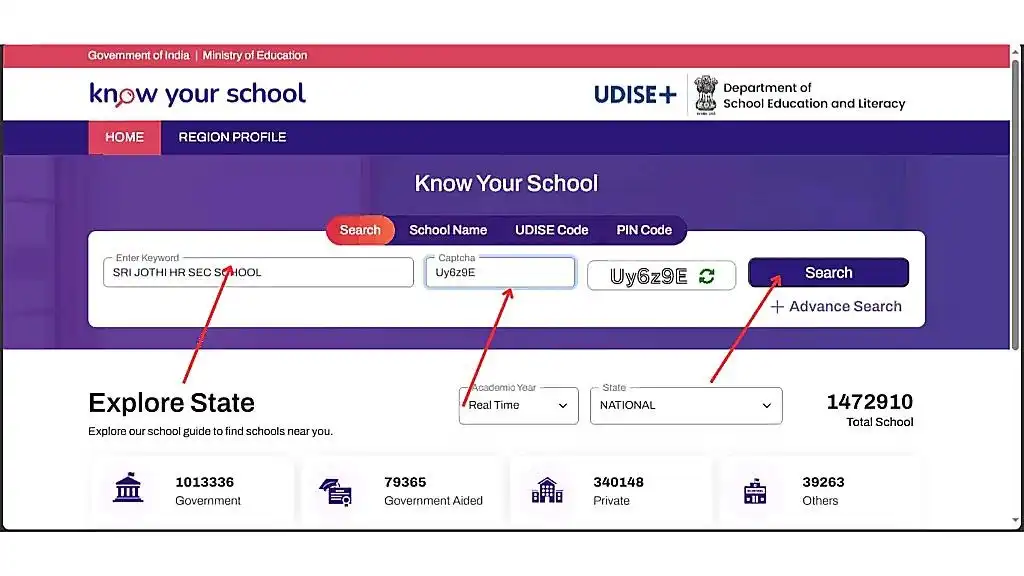
- Open the official website. Visit kys.udiseplus.gov.in.
- Locate the school search option. Look for the search field or school discovery tools displayed on the page.
- Enter the available information. Start with the school’s name, or use another supported search field.
- Narrow the results. Select the correct state and district where those filters are available.
- Review the matching schools. Compare the name, location, management type and other available details.
- Open the correct school record. Check the displayed information and locate the school’s identification code.
- Record the code carefully. Copy all the digits and verify that they belong to the intended school.
The exact layout and wording of the portal may change. If the search page looks different from an older guide or screenshot, follow the options currently displayed on the official website.
Practical tip: Do not choose a school based on its name alone. A result with the same name but a different district or village may belong to an entirely different institution.
Search by School Name
Searching by name is usually the easiest method when you already know the institution’s name.
For example, suppose you want to find the code of Government High School, Indiranagar, Bengaluru. Entering the school’s name or its main identifying words may help you locate the relevant record.
If the full name returns no results, try a shorter version. Some school records may use abbreviations, different spellings, or a slightly different official name.
Useful search variations include:
- The complete name of the school.
- The main words in the school’s name.
- The name without words such as “Government,” “Higher Secondary,” or “Senior Secondary.”
- The school’s name combined with the town or village.
- The name combined with the district or PIN code, where supported.
For instance, a school commonly known as “St. Mary’s School” might be listed under a longer official name such as “St. Mary’s Higher Secondary School.” Searching only the distinctive words may help you find the correct entry.
However, a partial name can also produce several matches. Always compare the location and other details before selecting a result.
Search by District and State
If you know the district but are unsure of the school’s exact name, a geographical search can be more helpful.
The UDISE code by district approach is particularly useful for people looking for schools in rural areas, small towns, or locations where school names are similar.
Start by identifying the correct state and district. Then narrow the search using the block, town, village or school name if those options are available.
For example, someone looking for a school in Mysuru district, Karnataka, should first confirm that the search is limited to Karnataka and the correct district. They can then compare school names and locations in the results.
This approach is also useful for school administrators who need to check nearby schools or prepare a list of schools within a specific area.
If you are searching for a school in the United States, note that UDISE+ is India’s school education data system. A school located in the US will not ordinarily have an Indian UDISE code simply because it provides school education. US schools use different identification systems, depending on the state and the relevant education authority.
Use the Advanced Search and State Exploration Options
If a basic search does not identify the school, look for the Advance Search or Explore State options on the Know Your School portal.
These tools can help you explore schools by geographical area and available school characteristics. The filters shown may vary according to the current portal version.
Try the following process:
- Open the Know Your School website.
- Select the relevant state in the available state filter.
- Choose the appropriate academic year if the portal asks you to do so.
- Narrow the results using the available geographical or school-related filters.
- Review the school records and select the institution that matches your information.
The official portal currently displays search fields for keywords, school names, UDISE codes and PIN codes, as well as options for exploring schools by state. A CAPTCHA may also appear before a search can be submitted.
If you are unsure which school name to enter, geographical exploration can be a useful alternative. It is particularly helpful when looking for a school in a village or a smaller locality.
Step-by-Step Guide to Finding a School’s Code
The following method combines a school-name search with location-based verification. It is suitable for parents checking school details, teachers looking up official records, and students who need the correct identification number for a form.
Information to Keep Ready Before Searching
You do not always need every detail to find a school. However, having additional information makes it easier to identify the correct record when multiple schools have similar names.
Information | Why it helps |
School’s full name | Gives you a starting point for the search |
State | Helps narrow down the geographical area |
District | Reduces confusion between schools with similar names |
Town, village or locality | Helps distinguish nearby institutions |
PIN code | Provides another way to narrow the search when supported |
School management type | Helps distinguish government, aided and private schools |
School level | Helps separate primary, secondary and higher secondary institutions |
For example, suppose you are searching for a school called Government High School in Karnataka. The name is not specific enough to identify one institution confidently.
If you also know that the school is in Mysuru district and a particular village, you have a much better basis for selecting the correct result.
Keep the school’s location ready before searching. It can be more useful than trying several versions of the same school name.
How to Identify the Correct School From Search Results
Once you receive search results, compare the information shown for each school. Do not automatically select the first result, even if the name appears correct.
Use this verification process:
- Check the complete name. Look for differences in spelling, abbreviations and school level.
- Confirm the state and district. Make sure the school is in the area you intended to search.
- Check the locality. Compare the village, town, block or other location details that are available.
- Review the management category. Check whether the school is listed as government, government-aided, private or another category.
- Compare other available details. School level, medium of instruction and address may help distinguish similar institutions.
- Record the displayed code. Keep the code with the school name and location so you can identify it again later.
For example, imagine two schools named National Public School. One is in Bengaluru, while another is in a different district or state. Their names may be identical, but their locations and identification codes will differ.
The correct result is the one that matches the institution you intend to identify—not necessarily the first or most familiar result.
How to Find a Government or Private School’s Code
The search process is broadly similar for government, government-aided and private schools. The important difference is that you must verify the management details instead of assuming the school belongs to a particular category.
The Know Your School portal displays school statistics across management categories, including government, government-aided, private and other schools.
Source: kys.udiseplus.gov.in
Finding the UDISE Code of a Government School
To find a UDISE code of government school, start with the school’s official or commonly used name. Then narrow the results by state and district.
For instance, if you are searching for a government primary school in a rural area, you may know its village name but not its full official name. Search using the main words in the name and compare the results with the village and district.
Check the following details where available:
- Official school name.
- State and district.
- Village, town or locality.
- School level.
- Management category.
A government school may be managed by a state department, local body or another government authority. Therefore, do not rely on the word “government” in the name alone. Confirm the management details displayed in the record.
If the school does not appear in the public directory, contact the relevant school administration or local education office for assistance. Do not assume that the school has no code simply because one search produces no results.
Finding the UDISE Code of a Private School
Private schools can also appear in UDISE+ records. To find the correct code, enter the school’s name and check the location and management information.
For example, a private school may use a short name on its signboard while appearing under a longer name in official records. Searching a distinctive part of the name, together with the district or PIN code, may help you find it.
Before using the result, verify:
- The school’s full or official name.
- Its location and district.
- The management category shown.
- The school level, where available.
- The identification code attached to the matching record.
Remember that being listed in UDISE+ does not, by itself, prove that a school is recognized by the relevant authority. The Ministry of Education’s published UDISE material makes this distinction explicit. If you need to verify recognition or affiliation, check the appropriate state education department or examination board separately.
What If the School Is Known by a Different Name?
Some schools are commonly known by a short name, a former name, a founder’s name or a local nickname. Their official records may use different wording.
Try searching with:
- The main identifying words in the name.
- A shortened version of the name.
- The school’s former name, if it was recently renamed.
- The locality and district.
- The name displayed on official school documents.
If you find several possible matches, compare the address and management information. If you still cannot determine which record is correct, ask the school office to confirm its official name and UDISE code.
This extra check is important when the code will be used on a scholarship form, transfer certificate request or official education record.
What Is the 11-Digit UDISE Code?
A UDISE 11 digit code is the school identification number used in India’s UDISE+ system. When checking a school record, you should copy the complete code exactly as it appears in the official record.
Do not confuse the UDISE code with a school’s name, examination board affiliation number, student identification number or internal school admission number.
The code is important because it helps distinguish individual schools in education records. If you enter an incorrect digit in a form, the system may fail to identify the intended school or may not accept the entry.
How to Check Whether You Have the Complete Code
Use the following checks before saving or submitting the number.
- Count the digits: Confirm that the number contains 11 digits when the record identifies it as an 11-digit UDISE code.
- Check the first and last digits: Compare the number carefully with the official school record.
- Avoid typing errors: Watch for missing digits, extra spaces or accidentally repeated numbers.
- Match the school name: Confirm that the code belongs to the intended institution.
- Save the source: Keep a note of the official record or page where you verified the number.
For example, if a school record displays a code, copy it directly instead of typing it from memory. A single incorrect digit can cause problems when the number is used in a school-related application.
You should also avoid guessing a code from the school’s state, district or location. The number must be verified against an official record.
Can You Find the Code Without Knowing It in Advance?
Yes. You do not need to know the UDISE code before starting a search. The purpose of the public school directory is to help you identify a school using other available details.
If you know the school’s name, start with a name search. If you only know the location, use the geographical search options. If you have the school’s PIN code, you can try that option on the official portal.
The key is to identify the correct school first and then record its code. Searching for the code itself is not necessary when you already have enough information to locate the school record.
At this stage, you should have a clear understanding of what the code represents, where to search for it, and how to distinguish a matching school from other institutions with similar names.
How to Verify a School’s UDISE Code
Finding a school record is only the first step. Before using the identification number on an application, school document or official form, you should confirm that the record belongs to the correct institution.
The safest method is to compare the code with the information displayed on the official Know Your School portal and, when necessary, confirm it with the school administration. This is especially important when several schools have similar names or when a school has recently changed its name, location or management.
A reliable UDISE code check online should involve more than copying a number from a search result. Check the school’s identity, location and other available details before using the code.
Check the School’s Report Card
The official Know Your School portal provides access to school information, including school profiles or report cards where available. These records can help you compare a school’s identification number with its published details.
To check a school report card UDISE record, follow these steps:
- Open the Know Your School portal.
- Search for the school using its name or another available search option.
- Select the result that matches the school’s location.
- Open the school profile or report card, if available.
- Look for the school’s UDISE code and compare it with the number you have.
- Review the other school details to ensure that the record matches the institution.
Depending on the information published for the school and the current portal interface, the profile may include details about school management, location, education levels, infrastructure and facilities.
For example, suppose a parent has received a school code from a school office. The parent can search the official directory, open the matching school record and compare the code, school name and location. If the information matches, the parent has a stronger basis for using that number.
Important: A school profile is a source of published school information, not a guarantee that every field is current or that the institution meets every regulatory requirement. For recognition, affiliation or other legal questions, consult the relevant education authority separately.
Confirm the School’s Location and Management Details
When you find a possible match, compare the details that distinguish it from other schools.
Detail to verify | What to check |
School name | Does it match the official or commonly used name? |
State and district | Is the school in the correct administrative area? |
Village, town or locality | Does the location match the school you are looking for? |
Management | Is the school listed under the expected category? |
School level | Does the record match the primary, secondary or higher secondary school? |
UDISE code | Does the number match the code shown in the record? |
Consider a school named Government Higher Secondary School in a town with several nearby villages. The school name alone may not be enough to confirm its identity. The village, district and management category can help distinguish it from other institutions.
If the details conflict, do not assume that the code is correct simply because the school name looks familiar. Check the official record again or contact the school office.
How to Find a School’s Code When You Do Not Know Its Name
Sometimes, a parent knows where a school is located but does not know its full official name. A student may remember only part of the name, while a researcher may need to identify schools in a particular area.
In these cases, a location-based search can be more useful than a name-only search.
Search Using the State, District and Locality
Start with the broadest location you know and narrow it down.
- Open the official Know Your School website.
- Select the state or geographical search option, if available.
- Choose the correct district.
- Use additional filters, such as a block, town or village, where supported.
- Review the matching schools and compare their locations.
- Open the relevant school record and note its identification code.
This is a practical way to find schools when the exact name is uncertain.
For example, imagine that a family has moved to a village in Karnataka and wants to identify the nearest government primary school. The family knows the village and district but not the school’s formal name. A location-based search may help identify candidate schools, which can then be checked against their actual addresses.
However, the school directory should not be treated as a guaranteed list of every school in walking distance. Search results depend on the data and filters available, and the nearest school may not necessarily be the most suitable school for the family’s needs.
Use the School’s PIN Code
The PIN code can be useful when the school name is common or the location is difficult to identify.
The Know Your School portal provides a PIN code search option. Enter the relevant PIN code in the supported search field and examine the resulting school records.
For better accuracy:
- Confirm that the PIN code belongs to the school’s area.
- Compare the school names and addresses in the results.
- Use the district or locality to narrow the list further.
- Check the individual school record before copying the code.
A PIN code may cover several villages, localities or institutions. Therefore, it can narrow a search but may not identify one school on its own.
Use the Schools Geo Portal
A map-based search can be useful when you know the general area but not the school’s name.
Visit the Schools Geo Portal to explore the available geographic school information. The options displayed on the site may change, and not every school detail will necessarily be available through the map interface.
A map-based search can be particularly helpful for:
- Identifying schools in rural or remote areas.
- Exploring the distribution of schools across a locality.
- Comparing the locations of multiple schools.
- Finding a school when only its approximate location is known.
For example, an education researcher studying school access in a district may use geographical information to identify schools within a particular area. The researcher can then open the relevant school records to verify their identification numbers.
Use the map as a discovery tool, and confirm the final code against the individual school record whenever possible.
Common Problems During a UDISE Code Search
A search does not always produce the expected result on the first attempt. The school may be listed under a different name, the location filters may be too broad, or the information available online may not reflect a recent change.
If you cannot find the school, try a different search method before concluding that the school is missing from the system.
School Not Appearing in the Results
If the school does not appear in the search results, work through these checks one by one.
- Try a shorter school name. Remove words that may vary between the school’s common name and its official record. Search for the most distinctive words first.
- Check the spelling. Try common spelling variations, abbreviations and alternative forms of the name.
- Verify the district. Make sure you have selected the correct district and state. Schools in different districts may have nearly identical names.
- Search using the PIN code. If the portal supports this option, it may help you identify schools in the relevant area.
- Explore the location. Use the available geographical search tools or the Schools Geo Portal to look for schools in the locality.
- Contact the school. Ask the office to confirm the official school name and UDISE code.
- Seek help from the education department. If the code is needed for an official purpose and the school cannot be found, contact the relevant block, district or state education authority.
There are several possible reasons for a missing result. The search terms may be incorrect, the record may use a different name, or the publicly available information may not reflect a recent administrative change. You should not assume that a school has no UDISE code simply because it does not appear in one search.
Duplicate Names, Changed Names and Outdated Information
Duplicate or similar school names are among the main reasons to verify a record before using its code.
For example, a district may contain several schools called Saraswati Shishu Mandir. One may be in a village, another in a town, and a third in a nearby block. A search based only on the name may produce several possible matches.
Use the following approach to resolve these cases:
- Compare the district and locality.
- Check the management category.
- Review the school level and other available details.
- Confirm whether the school has changed its name.
- Ask the school office to verify the code if the records do not agree.
A school may also move to a new building or change its management arrangements. Such changes do not automatically tell you whether its existing identification record has been updated.
If the school has recently relocated or changed its official name, ask the administration whether the change has been reflected in the relevant UDISE+ records. Avoid creating or assuming a new code based only on a name or address change.
What If the School’s Code and Name Do Not Match?
If you have a code but the portal displays a different school name, pause before using it.
First, check whether you entered every digit correctly. Next, search the school by name and compare the displayed code. If the difference remains, contact the school administration or relevant education authority.
Do not use a code simply because it appears on an old document. Older records may contain outdated details, transcription errors or information from a different academic year.
For official submissions, the most reliable course is to confirm the code against the current school record and the instructions provided by the organization requesting it.
UDISE Code vs. School ID, CBSE Affiliation Number and College Code
Different education systems use different identification numbers. These numbers may all relate to an educational institution, but they are not interchangeable.
A common mistake is to assume that any school registration number is its UDISE code. Before entering a number in a form, check which identification system the form actually requests.
Identification number | Main purpose | Can it replace a UDISE code? |
UDISE code | Identifies a school in India’s UDISE+ education data system | It is the relevant code when specifically requested |
School admission ID | Identifies a student or admission record within a school’s system | No |
CBSE affiliation number | Identifies a school in relation to CBSE affiliation | No |
State school registration number | May identify a school under a state-specific system | No, unless the form explicitly accepts it |
Internal school ID | Used by a school, software platform or management system | No |
College or university code | Identifies an institution within a particular higher education system | Not ordinarily |
Is a UDISE Code the Same as a CBSE Affiliation Number?
No. A UDISE code and a CBSE affiliation number serve different purposes.
UDISE+ is India’s school education information system, while a CBSE affiliation number relates to a school’s affiliation with the Central Board of Secondary Education.
A school may have both numbers, but one does not replace the other. If you need to confirm a school’s CBSE affiliation, use the official CBSE website and its available school affiliation resources.
Similarly, a school may have a state registration number or an internal management-system ID. Always use the number requested by the form or authority you are dealing with.
Can You Find the UDISE Code of a College?
The search phrase UDISE code of college can be confusing because UDISE+ is primarily concerned with school education, not the general identification of colleges and universities.
A standalone degree college or university ordinarily uses identification systems relevant to higher education rather than a school UDISE code. However, some institutions may offer multiple education levels or operate within a larger educational organization, so you should not decide solely from the word “college” in the institution’s name.
If you need the identification number of a degree college, first establish which authority is requesting it. Depending on the purpose, you may need to consult:
- The institution’s official website.
- The relevant state higher education department.
- The University Grants Commission (UGC).
- The All India Council for Technical Education (AICTE), where applicable.
- The relevant university or examination authority.
The UGC official website is a starting point for information about higher education institutions in India. For technical education, consult the AICTE website.
If the institution is a school offering school-level classes, use the official UDISE+ directory to check whether it has a relevant school record. Do not assume that every college or university has an 11-digit school identification number.
How to Find a UDISE Code State Wise
If you need to locate schools across a particular state rather than find one institution, a state-based search can help you explore the available records.
The phrase udise code state wise usually refers to finding school records organized by state, district and sometimes smaller administrative areas. This approach is useful for teachers preparing school lists, researchers studying education, parents comparing local options, and administrators checking school records.
How to Find a School UDISE Code List
The easiest starting point is the official Know Your School portal. Use its search and geographical exploration options to locate schools in the state and district you are interested in.
Follow these steps:
- Open the official portal.
- Choose the relevant state using the available search or exploration tools.
- Narrow the search to the district or locality.
- Review the matching school records.
- Open individual school profiles to check their details and codes.
- Record the results in a spreadsheet if you are compiling information for legitimate school administration or research purposes.
For example, a teacher preparing a list of schools in a district of Karnataka may begin by selecting the state, narrow the results to the relevant district, and then record each school’s name, location and code.
A school UDISE code list should include enough identifying information to avoid confusing schools with similar names. If you are building a list, consider using columns for the school name, UDISE code, state, district, locality and management category.
School name | UDISE code | State | District | Locality |
School A | Verify on the official portal | Karnataka | Relevant district | Actual locality |
School B | Verify on the official portal | Maharashtra | Relevant district | Actual locality |
School C | Verify on the official portal | Tamil Nadu | Relevant district | Actual locality |
These are illustrative rows, not actual school records. Enter codes only after checking the relevant official entries.
Do not fill missing codes using estimates or generated number patterns. If the official portal provides a downloadable report for your intended purpose, review its source, academic year and scope before using it. Do not assume that every public search result can be downloaded as one complete nationwide file.
Which States Can You Search?
The official portal supports school discovery across India’s states and Union Territories, subject to the records and search features available.
You can begin with any of the following examples:
- Karnataka
- Maharashtra
- Tamil Nadu
- Kerala
- Telangana
- Andhra Pradesh
- Uttar Pradesh
- Delhi
- Rajasthan
- West Bengal
These examples are starting points, not a complete list of all searchable locations. Select the state relevant to your search and then narrow the results to the district and locality.
The state-based method is particularly useful when you know where a school is located but have only partial information about its name.
Can You Find a School’s UDISE Code From Outside India?
Yes. A person in the United States or another country can generally access publicly available school information through India’s online school directory, provided the portal is accessible and the relevant record is available.
For example, an Indian parent living in California may need to verify the identity of a school attended by a child before relocating to India. The parent can search the Indian school’s name and location using the official portal without needing to be physically present in India.
Similarly, an education researcher in the United States may use UDISE+ school information for research involving India’s school system.
However, UDISE+ is an Indian school education system, not a global school identification directory. Schools in the United States generally use other identifiers maintained by federal, state or local education authorities.
What Should US-Based Readers Know?
If you are looking for a school located in India, use the Indian school’s name, state and district to search the UDISE+ portal.
If you are looking for a school located in the United States, UDISE+ will not ordinarily provide its identification number. Instead, consult the relevant US education authority.
Useful starting points include:
- National Center for Education Statistics (NCES) — a US source for education statistics and school information.
- NCES School Search — a tool for locating schools and related education institutions.
- The relevant state department of education — useful for state-specific school records and identifiers.
The identifier you need depends on the purpose of your search. A US school may have a state-assigned ID, an NCES identifier or another local identifier. None should be treated as equivalent to a UDISE code.
Practical Checklist Before Using a School’s Code
Before submitting the number on a form or sharing it with another organization, complete this checklist.
School code verification checklist
- I searched the official Know Your School portal.
- I confirmed the school’s full or commonly used name.
- I checked the state, district and locality.
- I verified the school’s management category where available.
- I copied the complete code from the relevant school record.
- I checked that the code and school details match.
- I confirmed the code with the school office if any details were unclear.
- I checked whether the requesting form requires a different type of school identifier.
Conclusion
Finding the UDISE code of a school becomes much easier when you start with the official Know Your School portal and use the information you already have. A school name is often enough to begin, but adding the state, district, locality or PIN code can help you distinguish between schools with similar names.
Once you find a possible match, check the school’s record before using the identification number. Confirm the school name, location and other available details, and contact the school administration if anything does not match.
The most important rule is simple: find the correct school first, verify its details, and then use its code. Avoid relying on guessed numbers or unverified third-party listings, especially when completing official forms.
Start your search on the official Know Your School portal and use the school’s verified record as your reference.
Common Questions About Finding UDISE Codes
The following answers address common questions from parents, students, teachers and school administrators.
How can I find a school’s UDISE code by name?
Visit the Know Your School portal, enter the school’s name in the available search field, and review the matching results. Confirm the state, district, locality and other available details before recording the code.
Can I find a UDISE code using only a district name?
You can use the district to narrow your search, provided the portal offers the relevant geographical filters. However, a district may contain many schools. You may need a village, town, school name or other detail to identify the correct institution.
Is the UDISE code always 11 digits?
The UDISE code used for school identification is commonly described as an 11-digit number. Always confirm the complete code against the official school record rather than relying on a number found in an unofficial directory.
Is the UDISE+ portal free to use?
The public Know Your School portal is intended to provide access to school information. You should start with the official government website rather than paying a third-party website simply to look up a school’s publicly available identification code.
Some separate services or documents may have their own requirements, but you should not assume that a fee is necessary to perform a basic school search.
Can I find a school’s code without knowing its full name?
Yes. Try a shorter name, PIN code or geographical search using the options available on the official portal. If you know only the village or locality, explore schools in that area and compare the resulting records.
How do I find the UDISE code of a private school?
Search for the school’s name and verify its location and management category. If the school is listed, its available record should help you identify the relevant code. If it is not listed, contact the school or the relevant education authority for assistance.
What should I do if a school’s code cannot be found?
Check the spelling, location and search filters. Try a different search method and ask the school office to confirm its official name and code. If the issue remains unresolved, contact the relevant education department rather than guessing the number.
Can I use the UDISE code to verify whether a school is recognized?
A UDISE code helps identify a school in the education data system, but the code alone does not establish that the school has all required approvals. For recognition or affiliation, consult the appropriate state education department or examination board.
Can I find a school code using Google Search?
Google may display school information from official websites and other directories. However, search snippets can be incomplete or outdated. Use Google to locate a possible record if needed, but verify the final code through the official Know Your School portal or the relevant education authority.
What is the official website for finding a school UDISE code?
The primary public search resource is the Know Your School portal. The UDISE+ official website provides additional information about the system and published education data.

Hey, I am Sachin Ramdurg. I run and manage futuredecider.com website that helps students, graduates, and professionals, to find and decide on their future career with ultimate future career advices and future career guides. I have an overall 12+ years of career guidance experience in multiple domains which has helped multiple students, graduates, and professionals to find the best career path for their future.